

How to Search Pending Patent Applications To See If Your Idea is Patented
Learn how to search pending patent applications using free tools like USPTO Patent Center and Google Patents. Find conflicts, read claims, and protect your IP.
*Written by Andrew Rapacke, Managing Partner, Registered Patent Attorney.* Andrew Rapacke is a registered patent attorney and the Managing Partner of The Rapacke Law Group, a full-service intellectual property law firm. He helps individuals and corporations across industries with the protection, prosecution, licensing, and enforcement of their intellectual property, with deep experience in patent, trademark, and copyright matters spanning software, AI and machine learning, blockchain, medical devices, and autonomous vehicle technology. A graduate of the United States Naval Academy, Andrew served as a Naval Engineering Officer before pursuing law and remains active in the startup and inventor communities throughout Florida.
By Andrew Rapacke, Managing Partner and Registered Patent Attorney, Rapacke Law Group
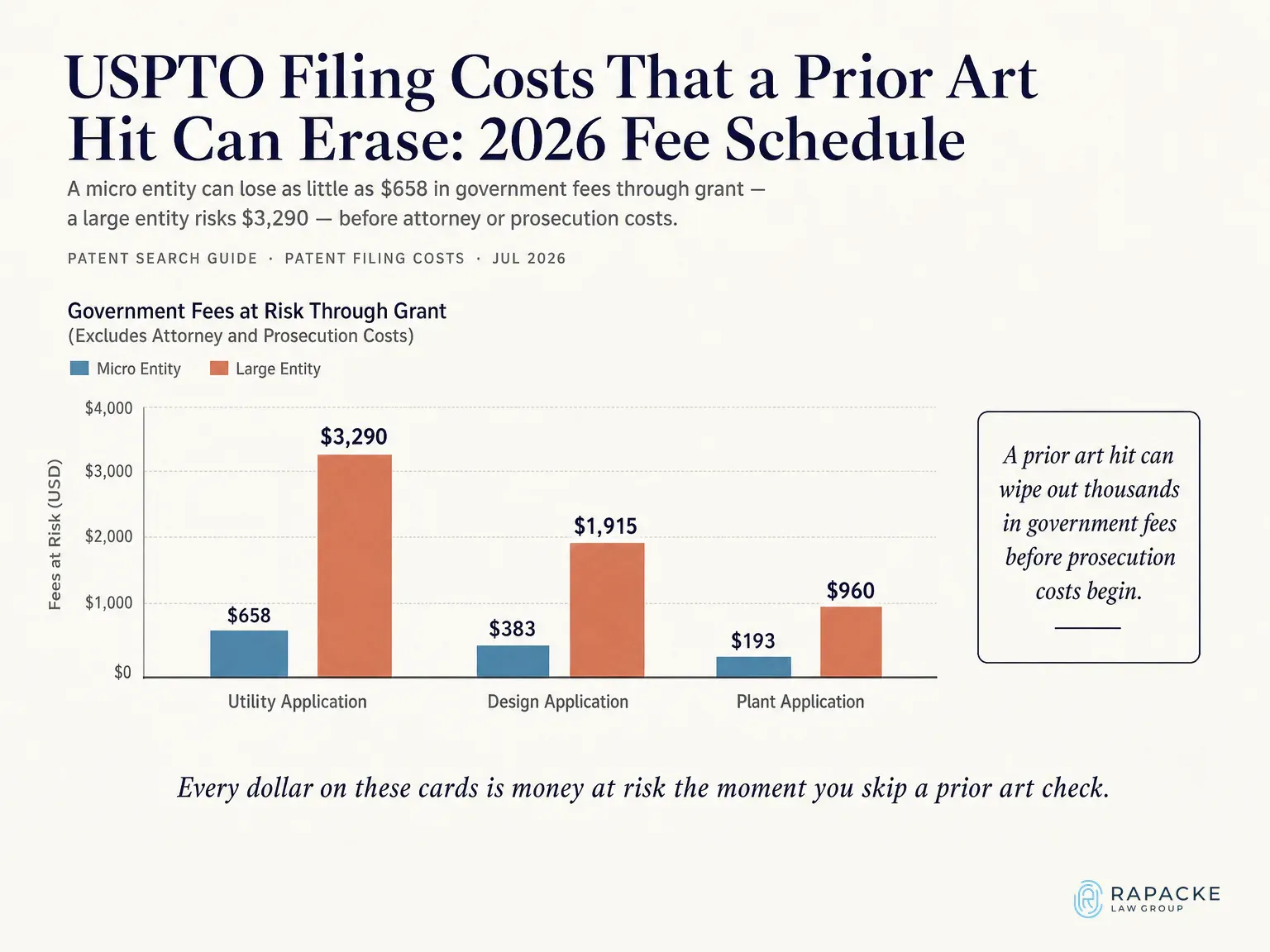
The USPTO fee schedule sets utility filing, search, and examination fees at $2,000 (large entity), $730 (small entity, electronic), and $400 (micro entity), with the issue fee, charges through grant reach $3,290, $1,246, and $658, before drawings, attorney preparation, or prosecution. A single prior art reference found after filing makes it all sunk cost, so learning how to patent search first is an inventor's cheapest risk control. It covers free databases, the professional keyword and classification workflow, reading results, and where DIY searching stops. Scope, utility patents, plus design patents where appearance matters.
A patent search protects money you are about to spend and helps you understand your intellectual property rights before committing to the patent process. The U.S. Patent Office does not refund filing, search, or examination fees when an examiner finds a reference that destroys novelty, and those fees run from $400 for a micro entity to $2,000 for a large entity before a single hour of drafting. Understanding the patent application process before you file is the most effective way to avoid wasted spend. Design applications run approximately $2,600, $1,040, and $520 through grant across the same tiers.
First actions are rarely clean. Allowance rates vary by technology area and art unit, and most applications draw at least one rejection before any claim is allowed. Every round of argument is billable time you can cut by knowing the closest references before you draft. Our guide on how to patent your product shows where the search fits in the sequence.
Prior art is any public disclosure before your effective filing date, and it is broader than existing patents or issued patents alone. MPEP Chapter 2100 treats technical papers, product manuals, conference materials, and trade show displays as printed publications when public accessibility and date can be established, useful patent information for any inventor evaluating prior art scope, a publicly posted YouTube demo counts too. Later-published U.S. patent documents, including published patent applications, count as of their earlier effective filing date. For novelty, one reference must disclose every claim element, obviousness can combine several. Close art is not fatal, as our breakdown of whether you can patent something that already exists explains.
Prior art is how your invention relates to earlier research. The word "art" here means skill, technique, or technology, and reviewing it works like the literature review in a scientific paper: it shows what was already known so an examiner can see what you added. The Background section of your application describes the state of the prior art and the problems your invention solves. Once you know of a reference that is material to patentability, you must disclose it to the USPTO, usually in an Information Disclosure Statement, under the duty of candor. The law does not require you to search, but a search tells you what that background and your claims must get around.
A patentability search asks whether your invention is new and nonobvious. A freedom-to-operate search asks whether making or selling your product would infringe someone else's live, enforceable claims. Raising patent infringement risk that is entirely separate from novelty. This guide covers the patentability side. A favorable novelty result is never a right-to-sell opinion, so confirm which question you need answered before you start.
Three free patent databases cover almost everything an inventor needs.
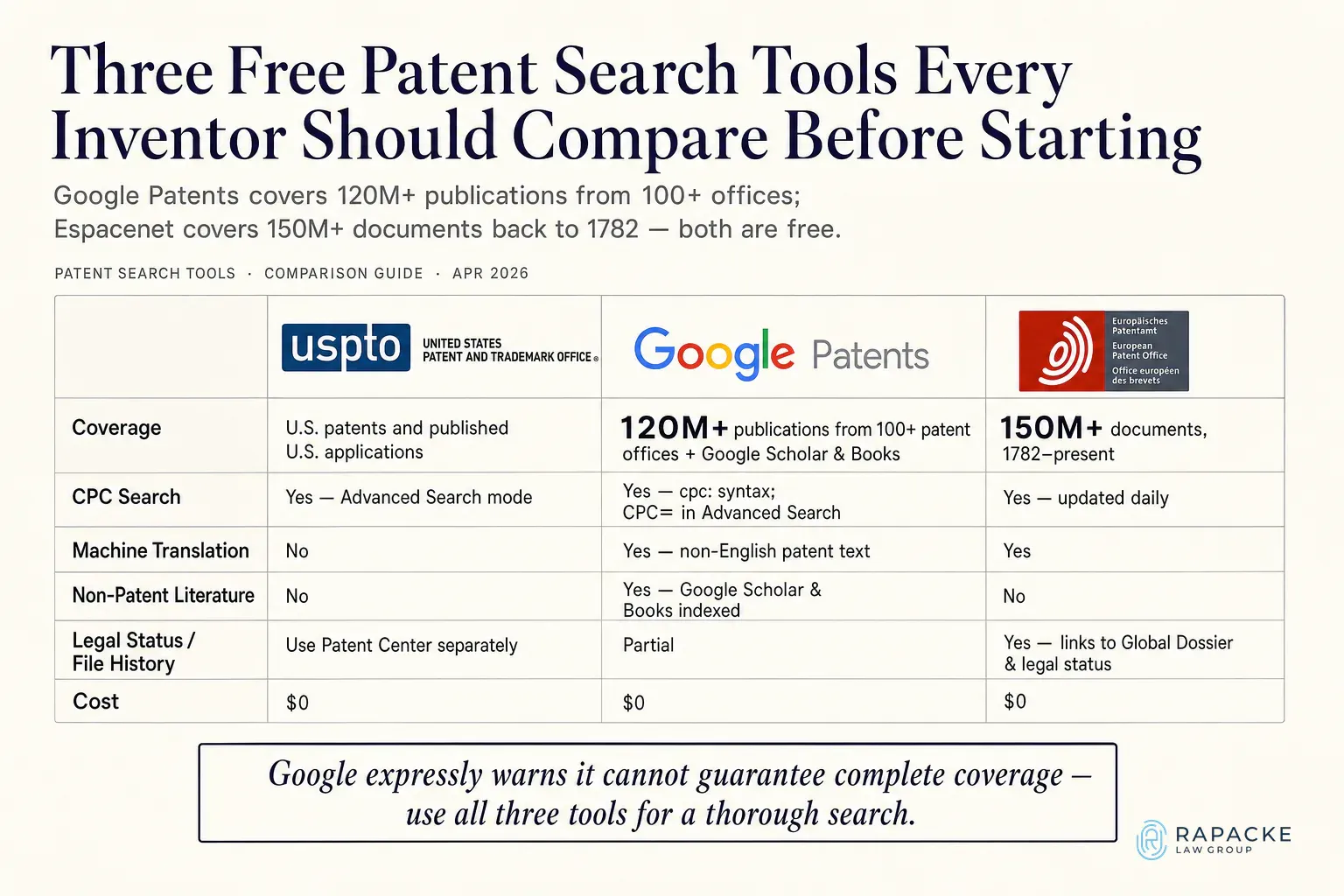
| Tool | Coverage | Best for |
|---|---|---|
| USPTO Patent Public Search | U.S. patents and published patent applications | Authoritative U.S. text searching with full Boolean and field syntax |
| Google Patents | 120M+ publications from 100+ offices, plus Scholar and Books | Fast first-pass scans, translations, and non-patent literature |
| Espacenet (European Patent Office) | 150M+ documents from 1782 forward | Family and legal status checks across foreign collections |
[RLG]Free strategy call

Talk it through with a registered patent attorney.
Free 15 to 45 minute IP strategy call, no obligation.
Patent Public Search replaced the USPTO's legacy systems, covering granted patents and published applications. Advanced mode adds field-specific queries, Boolean logic, filters, and relevance sorting for classification work. The USPTO reported roughly 4,500 people searching with it daily and nearly 350,000 users within months of launch, before retiring PatFT and AppFT. It holds full text for most U.S. patents issued since 1971, published applications since March 2001, and scanned text or basic data for older patents back to 1790. Use Patent Center for prosecution status and file history. See our guide to trademark and patent office search tools.
Google Patents indexes 120M+ publications from 100+ patent offices, making it a leading patent database for global discovery, and machine-translates non-English text, and pulls documents from Google Scholar and Books. It cannot guarantee complete coverage, so treat it as a discovery layer. Espacenet, from the European Patent Office, adds legal status and Global Dossier links, giving you access to patent information across more than 160 million documents including patent cooperation treaty filings.
Do not stop at patent databases. Scientific journal articles, conference papers, and theses count as prior art even when the research was never meant for commercial use, so search the journal databases for your field and Google Scholar alongside the patent tools.
Classification searching finds documents describing your concept in vocabulary you never considered. A keyword search for "drone tether" misses "unmanned aerial vehicle restraint assembly." CPC codes are assigned by function, not wording, so a CPC search catches both. Making patent searching by classification essential alongside keyword methods.
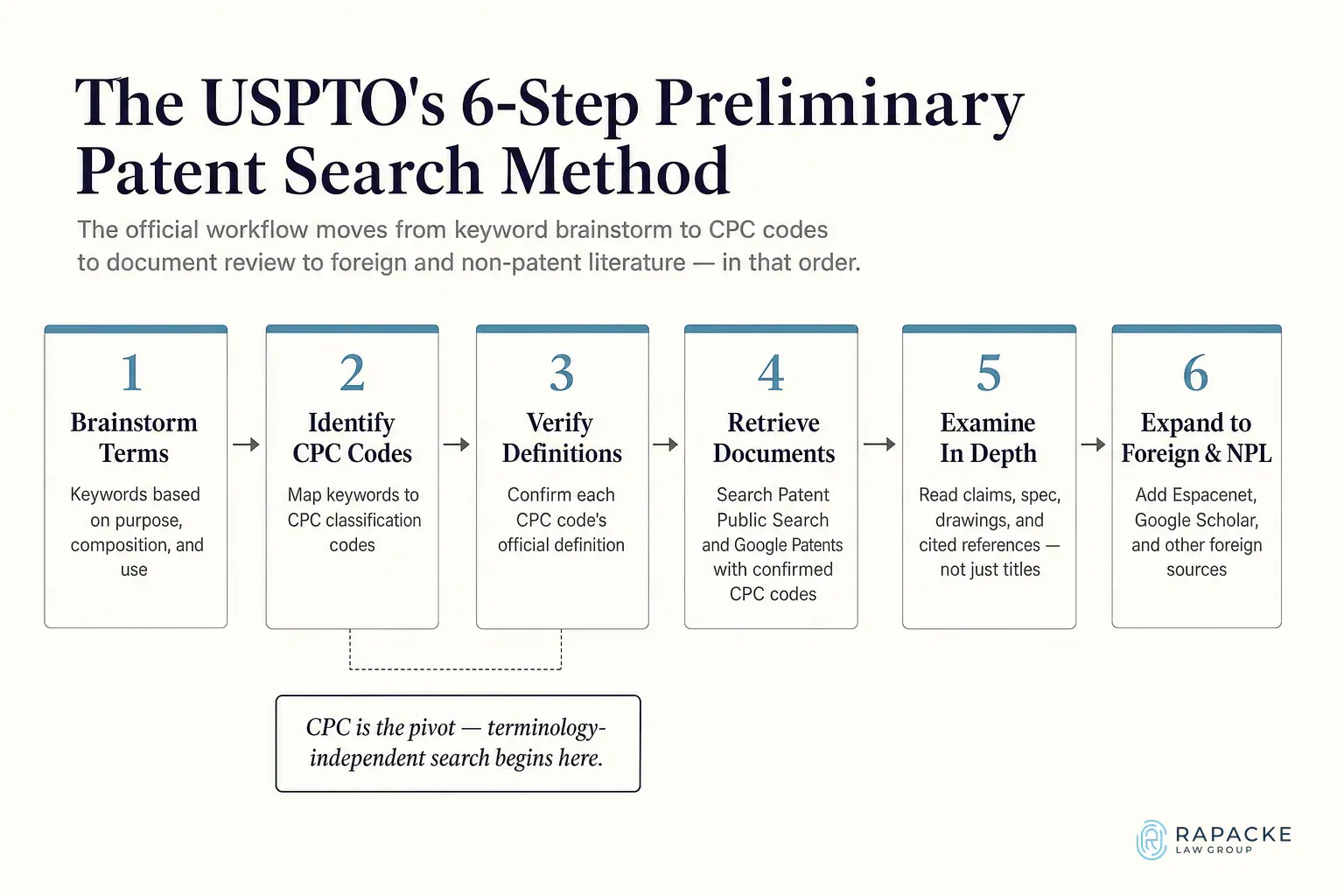
The Cooperative Patent Classification system is maintained jointly by the United States Patent Office and the European Patent Office and applied across major patent collections, making cooperative patent classifications the shared language of international search. The hierarchy runs section, class, subclass, main group, subgroup. The current CPC version is revised on a regular schedule, so check live definitions rather than an old blog post. Codes reduce terminology risk without eliminating it, combine them with keywords, cited references, and neighboring subclasses.
The United States Patent Office publishes a six-step preliminary search method worth following in order, brainstorm terms describing purpose, composition, and use, identify candidate CPC codes, verify each against its official definition, retrieve patents and published applications in those codes, review the closest documents in depth, then expand into foreign databases and non-patent literature.
The fastest shortcut is a seed document. Harvest every CPC code from one clearly relevant result, then search the parent code, subgroups, cited and citing references, and family members. In Google Patents Advanced Search, CPC=B60R22 requests that exact code while CPC=B60R22/low pulls in child classifications. Repeat with a second seed using different vocabulary. Software and AI inventions are hardest to classify, which is why our software patent search guide treats functional language as the starting point.
Titles are drafted for the patent office and routinely disguise what a document discloses, so judge relevance by the disclosure and look up specific patents by number when a reference seems critically close. For every close reference, log nine fields, document number, earliest priority date, publication date, status, family members, independent claims, relevant specification paragraphs and figures, elements disclosed, and the first element genuinely missing. Tracking inventor names alongside assignee history helps reveal design-around strategies competitors have already tried. See our explainer on the structure of a patent.
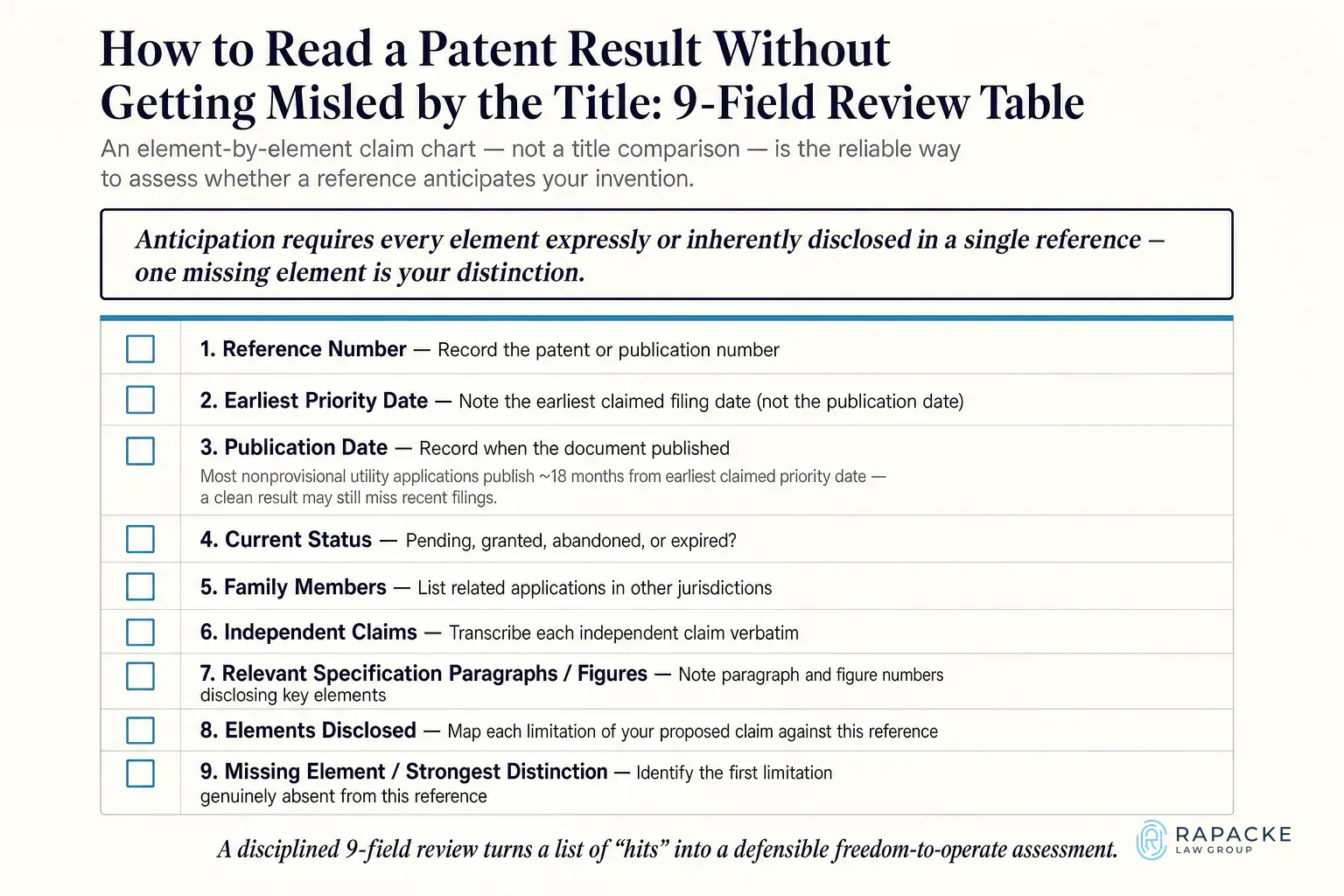
Independent claims define what a granted patent protects, dependent claims narrow from there. The claims section is the legal boundary examiners apply first. For novelty, the whole enabling disclosure counts. Under MPEP 2121 and 2131, anticipation requires every element, expressly or inherently disclosed and arranged as claimed, in a single reference, drawings alone can supply it. USPTO rules call the abstract a concise technical summary, preferably under 150 words, not the legal boundary. Triage on claim 1, then map element by element against the full text and figures, real patent examples build the instinct.
Published pending applications carry a publication number, not a grant number, and can qualify as prior art from their effective filing date; tracking these by their patent numbers is essential for accurate prior art mapping. Under MPEP 901, most nonprovisional utility applications publish about 18 months from the earliest claimed priority date; the U.S. Patent Office issues these as published patent applications that immediately become searchable prior art. Some publish early, some never publish after a nonpublication request, and U.S. design applications differ. Our guide to searching pending patent applications shows what's visible.
Zero results usually means a broken search, not a novel invention. A google patents search run in both directions, broad and narrow, helps confirm whether relevant patents were genuinely missed.
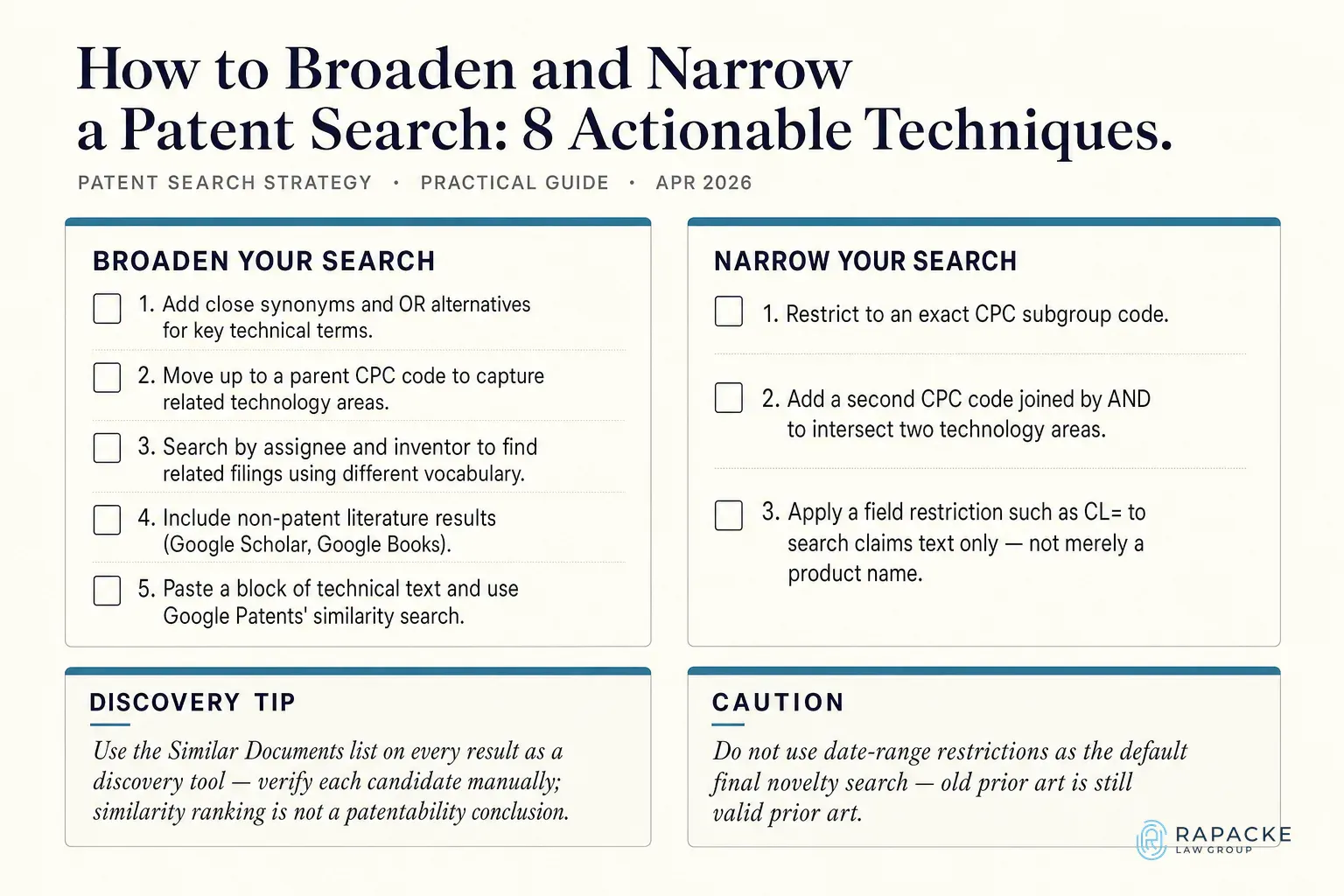
To broaden, swap product-specific nouns for functional language, add synonyms with OR, climb to the CPC parent code, and search by inventor name or assignee:"Company" to pull a competitor's whole portfolio. Paste your technical description into Google Patents for conceptual matches and to surface relevant patents you may have missed with keyword queries alone. Every result carries a Similar Documents list built on text similarity, a discovery tool, not a patentability conclusion. Search title, abstract, claims, and description separately, since a reference can hide the critical teaching in one paragraph. Our walkthrough of the process to search for patents associated with a product applies the same loop to a physical product.
To narrow, add a second CPC code with AND, restrict to claims text with CL=, or add the functional limitation defining your inventive concept. Sort by relevance, not date. Google's hit counts are approximate, it displays only the top-ranking member of a simple patent family, and CSV export is capped at 1,000 results. Avoid date filters in your final novelty search, because old references remain fully valid prior art.
A self-serve search screens for obvious blockers but cannot predict whether your claims survive examination.
First, publication lag, filings from the past 18 months are invisible, so clean results prove nothing about U.S. patent applications pending in that window. Second, classification judgment, a code that looks right can sit one subclass from the closest art, with no warning. Third, claim interpretation, examiners give terms their broadest reasonable interpretation consistent with the specification, so literal word matching cannot tell you whether a reference reads on your claims.
The value is not database access, Google Patents and Espacenet are free, but search design, classification judgment, family and legal status analysis, claim mapping, and a written opinion from a patent attorney who has read the closest references and judged whether your distinction is meaningful. A level of legal advice that a self-serve search cannot replicate. Rapacke Law Group performs professional patent searches grounded in patent law and delivered at a flat, upfront fee backed by the RLG Guarantee, a 100% refund if the search finds the invention is not novel. Software and AI founders should pair it with the SaaS Patent Guide 2.0.
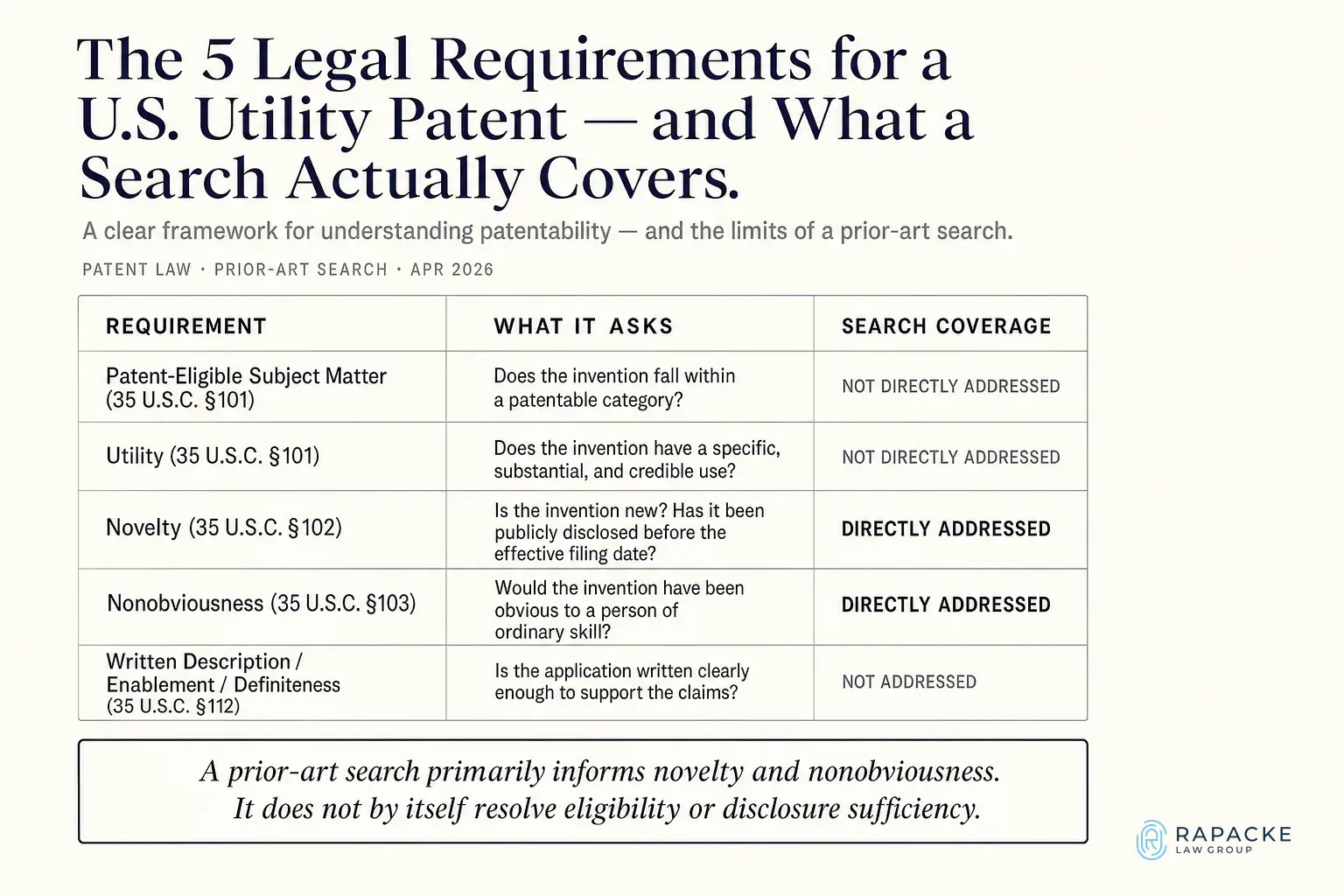
Run a prior art search. It shows whether your invention is new, which references your claims must get around, and what belongs in your application's background section. How you got to the invention does not matter: 35 U.S.C. 103 says patentability "shall not be negated by the manner in which the invention was made," whether by years of experiments or a sudden insight. What matters is how it differs from what was already public.
Yes, the free USPTO, Google Patents, and Espacenet databases plus the USPTO's six-step method make DIY patent searching realistic, unpublished filings and claim interpretation are the limits.
Searching public databases yourself is free. Professional fees vary, Rapacke Law Group quotes a flat fee up front, refunded under the RLG Guarantee if the invention is not novel.
Patent-eligible subject matter and usefulness (35 U.S.C. 101), novelty (102), nonobviousness (103), and a written description that enables others to make and use the invention (112). A prior art search speaks to novelty and nonobviousness.
USPTO examiners now use AI search tools. SimSearch ranks similar documents from the application text, and DesignVision searches design images across more than 80 global registers. Both are examiner tools, and human judgment still decides outcomes. See our AI patent search tools review.
Utility searches target function and structure; a uspto patent search for utility inventions covers both keyword and CPC methods, while design searches target ornamental appearance via design classifications, Locarno codes, and image comparison. Run both if appearance matters.
A missed reference costs far more than the hours a prior art search takes. Pick the right tools, build a CPC map from seed documents, read whole disclosures instead of titles, and stress test by broadening and narrowing until results stop changing.
The bottom line: A weak patent is drafted around prior art nobody looked for, and it collapses the first time an examiner or acquirer reads it closely. A strong one has claims aimed at the space competitors left open.
Waiting is expensive. Another applicant filing next month becomes prior art you will not see until examination, and investors reviewing your new invention will ask what search you ran before filing.
To Your Success,
Andrew Rapacke Managing Partner, Registered Patent Attorney Rapacke Law Group
[RLG]Free strategy call
Talk it through with a registered patent attorney.
[01]Keep reading
Learn how to search pending patent applications using free tools like USPTO Patent Center and Google Patents. Find conflicts, read claims, and protect your IP.
Learn how to run a trademark and patent office search using free USPTO tools, interpret results, and protect your IP before you file. Get a free strategy call.
Explore 10 real patent examples spanning utility, design, software, and provisional filings to evaluate your own idea before you file. Start your IP strategy today.
The #1 top reviewed IP law firm.* Talk to a registered patent attorney, free.
*#1 top reviewed means the most public client reviews on Google, Trustpilot and Avvo of any US patent or trademark firm.